AgentScript is the safe JavaScript subset that runs inside codecall:execute. It gives LLMs the power to orchestrate multiple tools, filter data, and build workflows — while the security pipeline ensures every script is validated, transformed, and sandboxed before execution.Core APIs Call a registered tool and get the result.
// Basic call - throws on error by default const users = await callTool ( ' users:list ' , { limit : 100 }); // Safe pattern - returns result object instead of throwing const result = await callTool ( ' users:get ' , { id : ' maybe-invalid ' }, { throwOnError : false }); if ( result . success ) { return result . data ; } else { return { error : result . error . message }; }
Parameters: Parameter Type Required Description namestringYes Tool name (e.g., 'users:list') inputobjectYes Input arguments for the tool optionsobjectNo Execution options
Options: Option Type Default Description throwOnErrorbooleantrueWhen false, returns { success, data, error } instead of throwing
Return value (when throwOnError: false): // Success { success : true , data : { /* tool result */ } } // Failure { success : false , error : { message : string , code ?: string } }
Get metadata about a tool (name, description, schemas) without calling it.
const meta = getTool ( ' users:list ' ); console . log ( meta . description ); // "List users with optional filtering" console . log ( meta . inputSchema ); // { type: "object", properties: { ... } }
codecallContext Read-only context object passed in the codecall:execute request. Use it to access tenant information, user IDs, or any custom data.
const tenantId = codecallContext . tenantId ; const userId = codecallContext . userId ; // Cannot modify - object is frozen codecallContext . tenantId = ' other ' ; // ❌ Throws error
console (if enabled) Standard console methods, captured in the response logs array.
console . log ( ' Processing users... ' ); console . warn ( ' Large dataset detected ' ); console . error ( ' Validation failed ' );
Console is only available if vm.allowConsole: true in plugin config. Logs are returned in the logs array of the response.
__safe_parallel(fns, options?) Execute multiple async operations in parallel with controlled concurrency.
const userIds = [ ' user-1 ' , ' user-2 ' , ' user-3 ' , ' user-4 ' , ' user-5 ' ]; const users = await __safe_parallel ( userIds . map ( id => () => callTool ( ' users:get ' , { id })), { maxConcurrency : 3 } ); return users ; // Array of results in same order as input
Options: Option Type Default Max Description maxConcurrencynumber10 20 Max concurrent operations
Limits: Limit Value Error Max array size 100 Cannot execute more than 100 operations in parallelMax concurrency 20 Silently clamped
Error behavior: If any operation fails, the entire __safe_parallel call fails with a combined error message.try { const results = await __safe_parallel ([ () => callTool ( ' users:get ' , { id : ' valid ' }), () => callTool ( ' users:get ' , { id : ' invalid ' }), // Throws () => callTool ( ' users:get ' , { id : ' also-valid ' }), ]); } catch ( error ) { // "1 of 3 parallel operations failed: // [1]: User not found" }
What You Can Write AgentScript supports a safe subset of JavaScript:
// ✅ Tool calls const users = await callTool ( ' users:list ' , { limit : 100 }); // ✅ Variables (const, let) const filtered = users . filter ( u => u . active ); let count = 0 ; // ✅ Arrow functions const names = users . map ( u => u . name ); const total = users . reduce (( sum , u ) => sum + u . score , 0 ); // ✅ Bounded loops for ( let i = 0 ; i < users . length ; i ++) { count ++; } for ( const user of users ) { console . log ( user . name ); } // ✅ Template literals const greeting = ` Hello, ${ user . name } ! ` ; // ✅ Destructuring const { name , email } = user ; const [ first , ... rest ] = users ; // ✅ Try/catch try { const data = await callTool ( ' api:fetch ' , { url : ' /data ' }); } catch ( e ) { return { error : e . message }; } // ✅ Safe built-ins const max = Math . max ( 1 , 2 , 3 ); const parsed = JSON . parse ( ' {"a":1} ' ); const keys = Object . keys ( obj ); const now = new Date (); // ✅ Context access (read-only) const tenant = codecallContext . tenantId ; // ✅ Return values return { count , names , total };
What Is Blocked
eval / Function / AsyncFunction
Dynamic code execution is blocked to prevent injection attacks. eval ( ' malicious code ' ); // ❌ Blocked new Function ( ' return process ' )(); // ❌ Blocked
Module loading is blocked to prevent sandbox escape. require ( ' fs ' ); // ❌ Blocked import ( ' child_process ' ); // ❌ Blocked
No access to Node.js globals or the host environment. process . env . SECRET ; // ❌ Blocked global . something ; // ❌ Blocked globalThis . escape ; // ❌ Blocked this . constructor ; // ❌ Blocked
while / do-while / for-in
Unbounded loops are blocked to prevent infinite execution. while ( true ) {} // ❌ Blocked do {} while ( condition ); // ❌ Blocked for ( key in obj ) {} // ❌ Blocked (prototype walking)
Use for-of or for with bounds instead.
Prototype manipulation is blocked to prevent pollution attacks. obj . __proto__ = {}; // ❌ Blocked obj . constructor . prototype . x = 1 ; // ❌ Blocked Object . prototype . polluted = true ; // ❌ Blocked
Identifiers starting with __ag_ or __safe_ are reserved for the runtime. const __ag_hack = ' foo ' ; // ❌ Blocked let __safe_bypass = 123 ; // ❌ Blocked
Async escape via timers is blocked. setTimeout ( fn , 100 ); // ❌ Blocked setInterval ( fn , 100 ); // ❌ Blocked setImmediate ( fn ); // ❌ Blocked
Regular expressions (strict mode)
In AgentScript’s strict mode, regex literals are blocked to prevent ReDoS. / pattern / . test ( str ); // ❌ Blocked in strict mode
Error Handling Patterns Basic: throwOnError // Default: throws on error const users = await callTool ( ' users:list ' , { limit : 100 }); // Safe: returns result object const result = await callTool ( ' users:get ' , { id : ' maybe-invalid ' }, { throwOnError : false }); if ( result . success ) { return { user : result . data }; } else { return { error : result . error . message , fallback : ' default-user ' }; }
Retry Pattern const retryTool = async ( toolName , args , maxRetries = 3 ) => { for ( let attempt = 1 ; attempt <= maxRetries ; attempt ++) { const result = await callTool ( toolName , args , { throwOnError : false }); if ( result . success ) { return result . data ; } // Don't retry non-transient errors if ( result . error . code === ' NOT_FOUND ' || result . error . code === ' VALIDATION_ERROR ' ) { throw new Error ( result . error . message ); } if ( attempt === maxRetries ) { throw new Error ( ` Failed after ${ maxRetries } attempts: ${ result . error . message } ` ); } console . warn ( ` Attempt ${ attempt } failed, retrying... ` ); } }; const data = await retryTool ( ' api:fetch ' , { url : ' /data ' });
Fallback Pattern // Try primary, fall back to secondary const result = await callTool ( ' cache:get ' , { key : ' users ' }, { throwOnError : false }); const users = result . success ? result . data : await callTool ( ' db:query ' , { table : ' users ' }); return users ;
Partial Success Pattern const ids = [ ' id-1 ' , ' id-2 ' , ' id-3 ' , ' id-4 ' ]; const results = { success : [], failed : [] }; for ( const id of ids ) { const result = await callTool ( ' users:get ' , { id }, { throwOnError : false }); if ( result . success ) { results . success . push ( result . data ); } else { results . failed . push ({ id , error : result . error . message }); } } return { users : results . success , errors : results . failed , successRate : results . success . length / ids . length , };
Parallel Execution Use __safe_parallel for concurrent operations:
Batch Fetching const ids = await callTool ( ' users:listIds ' , { limit : 50 }); const users = await __safe_parallel ( ids . map ( id => () => callTool ( ' users:get ' , { id })) ); return users ;
Parallel Aggregation const [ orders , users , metrics ] = await __safe_parallel ([ () => callTool ( ' orders:list ' , { status : ' pending ' }), () => callTool ( ' users:list ' , { role : ' admin ' }), () => callTool ( ' analytics:getMetrics ' , {}), ]); return { pendingOrders : orders . length , adminCount : users . length , metrics , };
Best Practices Keep scripts focused. Each script should do one logical operation. Break complex workflows into separate codecall:execute calls rather than writing mega-scripts.
Paginate large datasets. Don’t fetch everything at once. Use limit and offset parameters, and filter server-side.
Use throwOnError: false for optional operations. When a failure in one tool call shouldn’t abort the entire script, use the safe pattern.
Return only what you need. Filter and transform data inside the script so the LLM receives a minimal, focused result instead of raw tool output.
Next Steps
API Reference Complete meta-tool schemas, error codes, and debugging guide
Examples & Recipes Real-world patterns built with AgentScript
Security Model How AgentScript is validated, transformed, and sandboxed
Configuration VM presets, iteration limits, and console settings

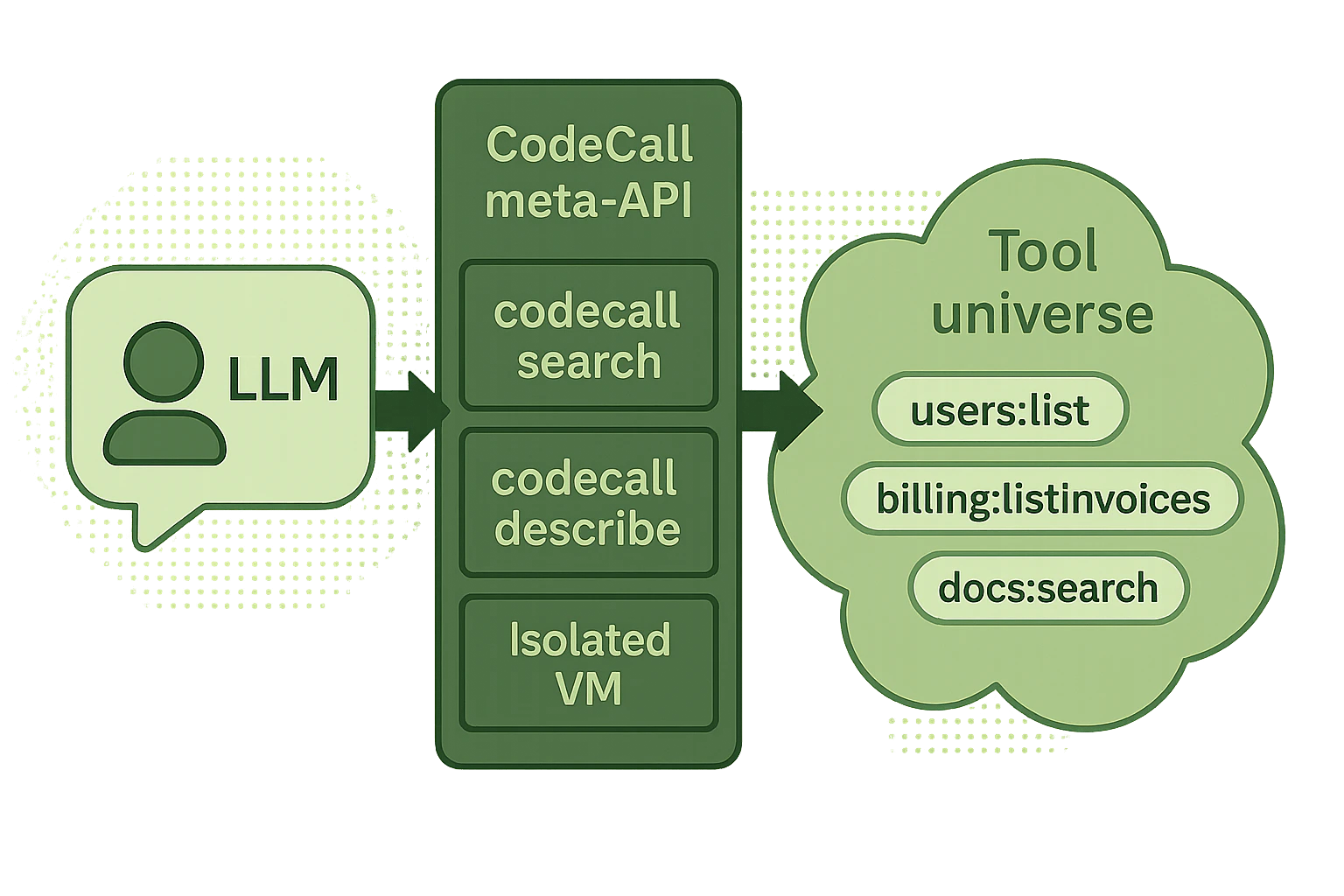 AgentScript is the safe JavaScript subset that runs inside