From 10 Lines to Autonomous Agents: How FrontMCP Turns Any Agent Into an MCP Tool
Learn how FrontMCP’s Agent as Tool pattern transforms autonomous AI agents into standard MCP tools—enabling multi-agent orchestration, tool isolation, and LLM-agnostic execution with just a decorator.
Estimated reading time: 15 minutes
Here’s a scenario you might recognize:You’ve built specialized AI agents. A research agent that gathers data. A writer agent that crafts content. An analyst agent that crunches numbers. Each one works brilliantly—in isolation.Then someone asks: “Can the writer agent use the research agent’s findings?”Suddenly you’re knee-deep in:
Custom message passing between agents
State synchronization nightmares
LLM provider lock-in (your agents only work with OpenAI)
Duplicate tool definitions across agents
No visibility into what’s happening inside the swarm
You’re not building AI features anymore. You’re building orchestration infrastructure.What if your agents could just… talk to each other? Like regular MCP tools?That’s exactly what FrontMCP’s Agent as Tool pattern does.
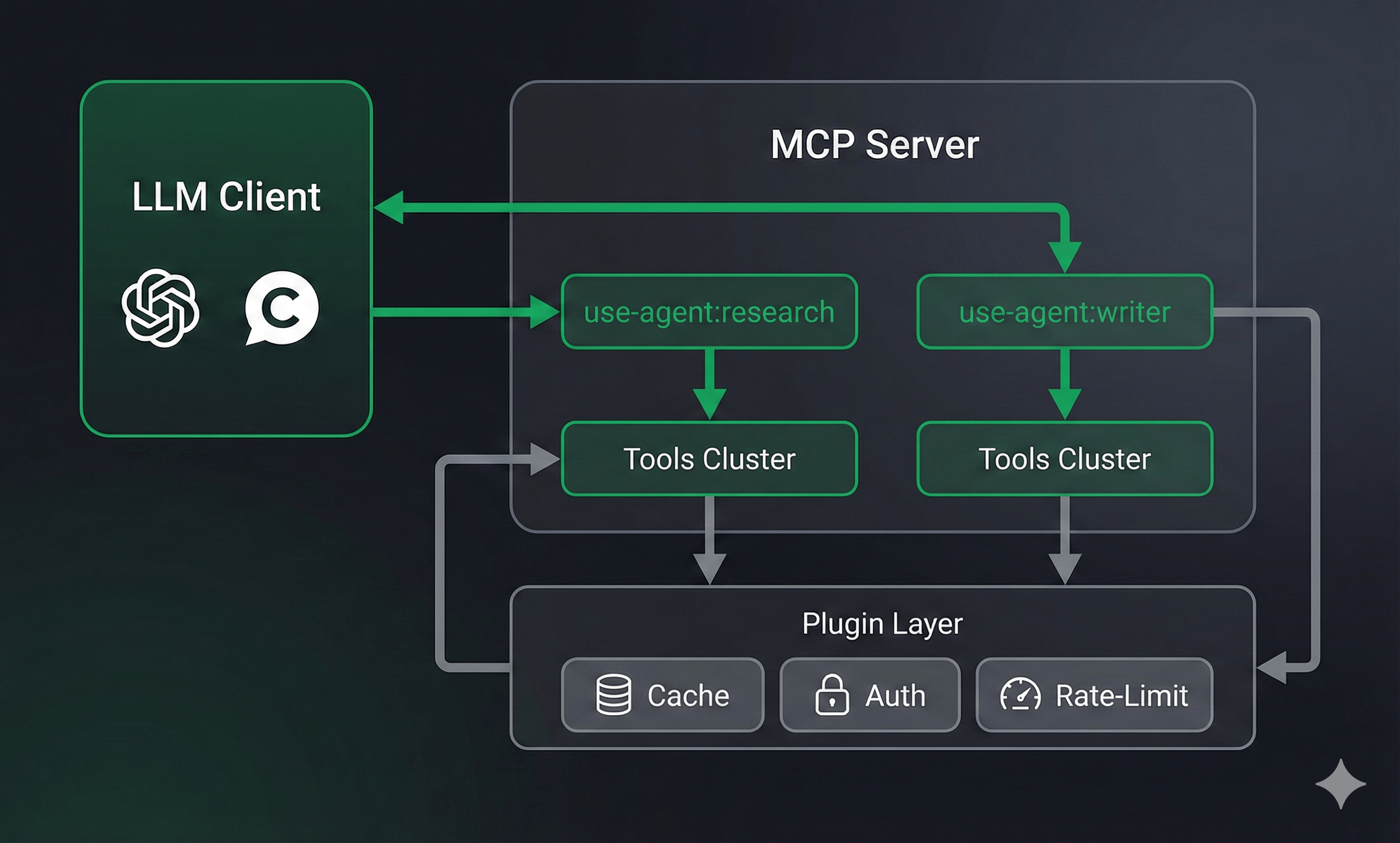
FrontMCP automatically registers it as use-agent:research-agent in your tool registry. Any other agent—or any MCP client—can call it like a regular tool.
Any LLM Provider
OpenAI, Anthropic, Google, Mistral, Groq—or bring your own adapter. Switch providers without rewriting agents.
Standard Tool Flow
Agents go through the same tools:call-tool flow as regular tools. All your plugins (cache, rate-limit, auth) work automatically.
Private Scoping
Each agent gets its own isolated scope. Its tools, resources, and prompts are private—not exposed to the parent app.
Swarm-Ready
Built-in visibility controls let you define which agents can see and invoke other agents. Orchestrator patterns work out of the box.
For simpler agents or when you prefer functional style:
import { agent, z } from '@frontmcp/sdk';const EchoAgent = agent({ name: 'echo-agent', description: 'Echoes back the input with analysis', inputSchema: { message: z.string() }, llm: { provider: 'openai', model: 'gpt-3.5-turbo', apiKey: { env: 'OPENAI_API_KEY' } },})(async ({ message }) => { // Direct return without LLM loop return { echoed: `You said: ${message}` };});
Use the function builder for simple agents that don’t need the full LLM loop. Use class-based for agents that need tool access, custom logic, or advanced configuration.
// Worker agents (hidden from each other)@Agent({ name: 'research-worker', swarm: { isVisible: true, // Visible to other agents canSeeOtherAgents: false, // Cannot invoke other agents }, tools: [WebSearchTool], // ...})class ResearchWorker extends AgentContext {}@Agent({ name: 'writer-worker', swarm: { isVisible: true, canSeeOtherAgents: false }, tools: [DraftTool], // ...})class WriterWorker extends AgentContext {}// Orchestrator (can see and invoke workers)@Agent({ name: 'content-orchestrator', systemInstructions: `You coordinate content creation. 1. Use research-worker to gather information 2. Use writer-worker to draft content 3. Review and refine the final output`, swarm: { canSeeOtherAgents: true, visibleAgents: ['research-worker', 'writer-worker'], maxCallDepth: 3, // Prevent infinite recursion }, // ...})class ContentOrchestrator extends AgentContext {}
When ContentOrchestrator runs, it can invoke use-agent:research-worker and use-agent:writer-worker as tools. The workers only see their own private tools.
@Agent({ name: 'article-generator', agents: [ResearchWorker, WriterWorker, EditorAgent], tools: [PublishTool], systemInstructions: `Generate articles by: 1. Research the topic (use-agent:research-worker) 2. Write the draft (use-agent:writer-worker) 3. Edit for quality (use-agent:editor-agent) 4. Publish the final version (publish tool)`, // ...})class ArticleGenerator extends AgentContext {}
Nested agents are scoped to the parent agent and not visible to the broader app.
Swarm Configuration Reference
swarm: { // Can this agent invoke other agents? canSeeOtherAgents?: boolean; // default: false // If true, which specific agents can it see? visibleAgents?: string[]; // whitelist of agent IDs // Is this agent visible to other agents? isVisible?: boolean; // default: true // Maximum nested agent call depth maxCallDepth?: number; // default: 3}
Here’s the complete weather agent from the FrontMCP demo:
import { Agent, AgentContext, z } from '@frontmcp/sdk';import GetWeatherTool from '../tools/get-weather.tool';@Agent({ name: 'summary-agent', description: 'Provides weather summaries for any location', systemInstructions: `You are a weather assistant. Use the get-weather tool to fetch current conditions, then provide a friendly, conversational summary. Include temperature, conditions, and any notable weather patterns.`, inputSchema: { location: z.string().describe('City name or location'), units: z.enum(['celsius', 'fahrenheit']).optional().default('celsius'), }, outputSchema: { summary: z.string().describe('Friendly weather summary'), temperature: z.number().describe('Current temperature'), conditions: z.string().describe('Weather conditions'), }, llm: { provider: 'openai', model: 'gpt-4-turbo', apiKey: { env: 'OPENAI_API_KEY' }, }, tools: [GetWeatherTool], codecall: { visibleInListTools: true },})export default class SummaryAgent extends AgentContext {}
{ "content": [ { "type": "text", "text": "{\"summary\":\"It's a beautiful day in San Francisco! Currently 68°F with clear skies and a light breeze. Perfect weather for a walk.\",\"temperature\":68,\"conditions\":\"sunny\"}" } ]}
Use execution.useToolFlow: false to bypass the plugin layer for agent-internal tool calls. This reduces latency but loses plugin features like caching and rate limiting.
Complete API reference for agent configuration, swarm patterns, and LLM adapters
Weather Demo App
Working example with agent, tools, and UI rendering
5-Minute Quickstart
Get your first FrontMCP server running with agents
Multi-Agent Patterns
Deep dive into orchestrator patterns and visibility controls
Agents are just one piece of FrontMCP’s production-ready MCP framework. Combine them with CodeCall for code execution, Tool UI for rich widgets, and deploy to Vercel or any Node.js environment.Star us on GitHub to follow development.