
Estimated reading time: 8 minutes
- Provisioning servers
- Setting up load balancers
- Configuring Redis for sessions
- Managing SSL certificates
- Worrying about scaling
- Paying for idle capacity
vercel deploy?
FrontMCP has first-class Vercel support. One command generates the right build artifacts. Your server runs on Vercel’s edge network, scales automatically, and costs nothing when idle.
Let’s ship it.
What You’ll Deploy
By the end of this guide, you’ll have:Global Edge Deployment
Your MCP server running on Vercel’s worldwide network—low latency everywhere.
Automatic Scaling
Zero to thousands of requests with no configuration. Pay only for what you use.
Vercel KV Sessions
Edge-compatible session storage that works with serverless architecture.
One-Command Deploys
Push to git, deployment happens automatically. Or run
vercel deploy.Prerequisites
Before you start:Vercel Account
Sign up at vercel.com if you haven’t already. The Hobby tier is free.
One-Command Build
FrontMCP’s CLI handles all the Vercel-specific configuration:- Compiles your TypeScript to ESM
- Bundles everything into a single
handler.cjsfile - Generates Vercel’s Build Output API structure
- Detects your package manager (npm/yarn/pnpm/bun)
- Creates
vercel.jsonwith correct configuration
What Gets Generated
What Gets Generated
After running The
frontmcp build --adapter vercel, your project contains:.vc-config.json configures:- Runtime: Node.js 22.x
- Handler:
handler.cjs - Launcher: Nodejs type
config.json point all traffic to your function.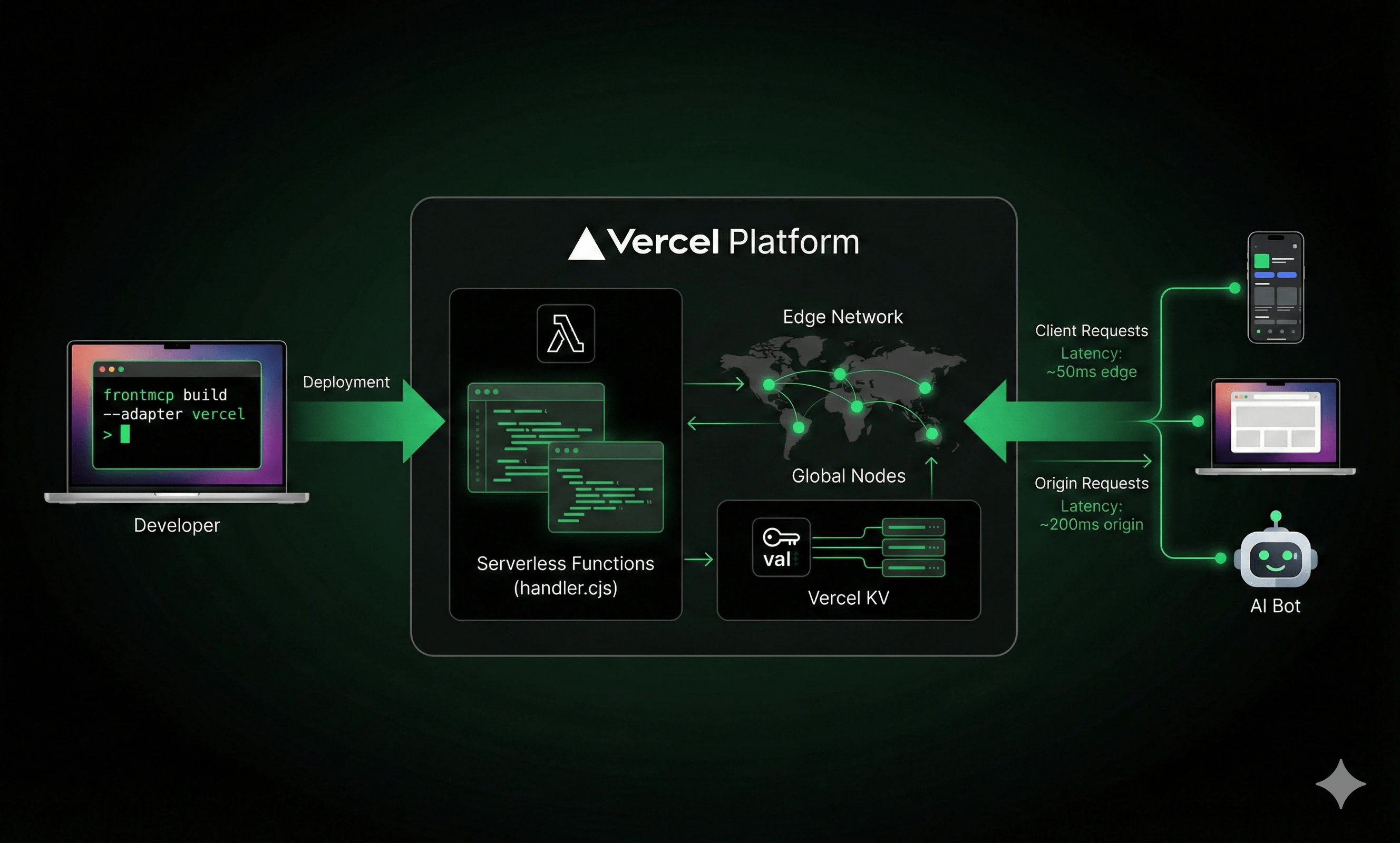
Deployment Steps
Add Environment Variables
Your MCP server likely needs API keys. Add them to For production, set them in Vercel Dashboard or via CLI:
.env.local:Deploy
Run the deploy command:For production:
Vercel returns a URL like
https://my-mcp-server.vercel.appAdding Vercel KV for Sessions
Standard Redis requires a persistent TCP connection—which serverless doesn’t have. Vercel KV is a REST-based key-value store that works perfectly with serverless.Enable Vercel KV
Add KV to Your Project
In Vercel Dashboard:
- Go to your project → Storage
- Click “Create Database”
- Select “KV”
- Name it (e.g.,
my-mcp-sessions)
KV_REST_API_URL and KV_REST_API_TOKEN to your environment.Vercel KV vs Standard Redis
| Feature | Vercel KV | Standard Redis |
|---|---|---|
| Transport | REST (edge-compatible) | TCP (requires connection) |
| Latency | ~5-15ms | ~1-5ms |
| Pub/Sub | Not supported | Supported |
| Resource Subscriptions | Requires hybrid setup | Fully supported |
| Setup | One-click in dashboard | Provision + configure |
| Cost | Pay-per-request | Fixed instance cost |
Serverless Considerations
Function Timeout
Vercel serverless functions have timeout limits:| Tier | Max Duration |
|---|---|
| Hobby | 60 seconds |
| Pro | 300 seconds |
| Enterprise | 900 seconds |
.vc-config.json. You can customize this via the CLI:
.vercel/output/functions/index.func/.vc-config.json:
The
maxDuration value must not exceed your Vercel tier limit. Hobby tier caps at 60 seconds.Cold Starts
The first request after idle may take 1-3 seconds while Vercel spins up your function. Subsequent requests (warm starts) are much faster. FrontMCP tracks this for you:Session Persistence Across Cold Starts
Here’s where FrontMCP shines: clients don’t need to re-initialize MCP when functions wake up from idle. Traditional MCP servers lose all state when they restart. Clients must detect the disconnect, re-sendinitialize, and rebuild their session. This creates a terrible user experience in serverless environments where functions spin down after ~15 minutes of inactivity.
FrontMCP handles this automatically:
This means:
- No client-side reconnection logic needed for cold starts
- Session state persists across function invocations
- Seamless experience even with aggressive function recycling
Resource Subscriptions (Hybrid Setup)
Vercel KV doesn’t support Pub/Sub, which means real-time resource subscriptions won’t work out of the box. If you need subscriptions:Recommended Redis Services for Pub/Sub
Recommended Redis Services for Pub/Sub
- Upstash - Serverless Redis, pay-per-request, integrates with Vercel
- Redis Cloud - Managed Redis with free tier
- AWS ElastiCache - If you’re already on AWS
Project Structure
A typical Vercel-ready FrontMCP project:vercel.json (auto-generated):
FrontMCP auto-detects your package manager. If you use yarn or pnpm, the generated
vercel.json will have the correct commands.Monitoring & Debugging
Vercel Dashboard
The Vercel dashboard shows:- Function invocations and duration
- Error rates and logs
- Request/response details
Logging
FrontMCP logs are captured by Vercel:Error Tracking
For production, connect Vercel to your error tracking service:CI/CD Setup
Connect your git repository for automatic deployments:Connect Repository
In Vercel Dashboard:
- Import your GitHub/GitLab/Bitbucket repo
- Vercel auto-detects the build settings
Configure Build
Set the build command in project settings:
- Build Command:
frontmcp build --adapter vercel - Output Directory:
.vercel/output - Install Command:
npm install(or yarn/pnpm)
Cost Optimization
Vercel’s serverless pricing is usage-based:| Resource | Hobby (Free) | Pro ($20/mo) |
|---|---|---|
| Function Invocations | 100K/mo | 1M/mo |
| Function Duration | 100 GB-hrs | 1000 GB-hrs |
| Bandwidth | 100 GB | 1 TB |
| KV Operations | 30K/day | 150K/day |
Troubleshooting
Function Timeout Error
Function Timeout Error
Symptom: 504 Gateway TimeoutSolution:
- Increase max duration in
vercel.json - Upgrade to Pro tier for longer limits
- Break long operations into smaller chunks
Missing Environment Variables
Missing Environment Variables
Symptom:
OPENAI_API_KEY is not definedSolution:Cold Start Latency
Cold Start Latency
Symptom: First request takes 2-3 secondsSolution: This is expected for serverless. For lower latency:
- Keep functions small (faster cold starts)
- Use edge functions for ultra-low latency
- Consider Pro tier with more resources
KV Connection Errors
KV Connection Errors
Symptom:
Could not connect to Vercel KVSolution:- Ensure KV database is linked to project
- Check that
KV_REST_API_URLandKV_REST_API_TOKENare set - Redeploy after linking KV
What’s Next
Serverless Documentation
Deep dive into serverless patterns, hybrid configurations, and edge optimization
Vercel KV Guide
Complete guide to session storage, caching, and KV best practices
Production Checklist
Security hardening, monitoring, and production readiness
AWS Lambda Deployment
Alternative: Deploy to AWS Lambda with SAM or Serverless Framework
FrontMCP supports multiple deployment targets: Vercel, AWS Lambda, Cloudflare Workers, and traditional Node.js servers. Choose what fits your infrastructure. Star us on GitHub to follow development.